GuideRecruiting metrics that matter, and how to measure them
Contents

Short answer
Recruiting metrics are the numbers that show how fast, how well and at what cost your team hires. Track a small set in five groups: speed (time to schedule, time to hire, time to fill), quality (offer acceptance, quality of hire), efficiency (cost per hire, interviews per hire), candidate experience, and interviewer health.
What are recruiting metrics?
Recruiting metrics measure the hiring process: how long each step takes, how many candidates move through it, what it costs and how people experience it. Recruitment KPIs are the handful of those metrics you set targets for and review every week. Talent acquisition metrics are the same idea at department level, usually with cost and quality of hire added.
More metrics isn’t better. A team that tracks five numbers it trusts makes better decisions than one with forty it argues about. Choose the metrics that match decisions you actually make: where to add coordinators, which loops to shorten, which interviewers need a break.
Recruiting metrics and KPIs: formulas at a glance
Sixteen metrics in five groups. Copy the formulas into your reporting tool and write down your start and stop events, so everyone calculates them the same way.
| Metric | Formula | What it tells you | Where the data lives |
|---|---|---|---|
| Time to schedule | Interview confirmed − scheduling request made, in hours; report the median | How long candidates wait for an interview to be booked | Scheduling tool or ATS activity log, plus calendars |
| Time to hire | Offer accepted − candidate entered the pipeline, in days | How long your process takes from the candidate’s side | ATS stage history |
| Time to fill | Offer accepted − requisition opened, in calendar days | How long the business waits for the seat | ATS requisition and offer records |
| Stage duration | Left stage − entered stage, per candidate; report the median | Where candidates stall | ATS stage history |
| Offer acceptance rate | Offers accepted ÷ offers extended × 100 | Whether your process and offers land | ATS offer records |
| Quality of hire | Your chosen measure (for example, performance rating or 12-month retention) for a hiring cohort | Whether hiring decisions hold up | HRIS and performance system |
| Stage pass-through rate | Candidates advancing from a stage ÷ candidates entering it × 100 | Whether each step filters the right people | ATS stage history |
| Cost per hire | (External costs + internal costs) ÷ hires in the period | What each hire costs | Finance, agency invoices, ATS |
| Interviews per hire | Interviews held ÷ hires, per role or team | How much interviewer time a hire consumes | Calendars or scheduling tool, plus ATS |
| Requisitions per recruiter | Requisitions handled in a year ÷ recruiters | Recruiter workload | ATS |
| Candidate satisfaction | Average survey score or NPS after the interview stage | How candidates experience the process | Candidate survey tool |
| Reschedule rate | Interviews rescheduled ÷ interviews scheduled × 100, split by who asked | Scheduling churn | Scheduling tool or calendars |
| No-show rate | Interviews missed by the candidate or an interviewer ÷ interviews scheduled × 100 | Whether reminders and logistics work | Scheduling tool, ATS |
| Interviewer load | Interviews per interviewer per week, at the median and the busiest 10% | Whether load is shared or concentrated | Calendars or scheduling tool |
| Interviewer decline rate | Invites declined ÷ invites sent × 100 | Calendar fit and interviewer fatigue | Calendar responses, scheduling tool |
| Trained interviewer coverage | Qualified interviewers per interview type, plus trainees in progress | Bench depth before a hiring push | Interviewer training records |
Speed metrics: time to hire vs time to fill
Time to fill and time to hire get mixed up constantly, and the difference matters. Time to fill is the business view. SHRM defines it as “the number of days from the time the job requisition was opened to the time the offer was accepted by the candidate,” counted in calendar days, weekends and holidays included (SHRM, 2025). Time to hire is the candidate view: it starts when a particular candidate enters your pipeline and ends when they accept.
A role can have a long time to fill and a short time to hire. The requisition sat open for six weeks before you found the right person, then you moved them from application to offer in two. The first number is a sourcing or approvals problem. The second is a process problem, and it’s the one candidates feel.
Stage duration breaks both down. Measure the median days candidates spend in each stage and the slow stage is usually obvious: approvals, scheduling, or the quiet gap between the final interview and the decision.
Time to schedule: the recruiting metric most teams don’t track
Time to schedule is the time between asking for an interview and having it confirmed. It’s the part of time to hire that is pure logistics: nobody is assessing the candidate while they wait for a calendar slot. And it compounds. A process with five interviews and a two-day wait before each one has added ten days before anyone makes a decision.
To calculate it, take each interview, subtract the time the scheduling request was made (or the candidate moved stage) from the time the interview was confirmed, and report the median in hours. The clock keeps running overnight and at weekends, because the candidate’s clock does. For a worked example, read how to calculate time to schedule.
Three rules make the number useful:
- Split it by interview type. Phone screens, panels and onsite loops have different realistic targets.
- Report the median and the slowest 10%. An average hides the loops that took a week.
- Separate waiting on the candidate from waiting on you. If you record when the candidate’s availability came back, you know which side to fix.
For reference points, see our interview scheduling benchmarks.
Quality and efficiency metrics
Speed without quality is just fast churn. Offer acceptance rate is the quickest quality signal: if it drops, look at compensation, the gap between the final interview and the offer, and what candidates heard during the loop.
Quality of hire is harder, which is why few teams measure it. SHRM found that 20% of organizations used quality-of-hire measures in 2025, down from 27% in 2022, and that the most common measures were interviews to evaluate performance, performance appraisal scores and retention rates (SHRM, 2025). Pick one measure, apply it to a hiring cohort and look again at six and 12 months.
Stage pass-through rates connect quality to cost. If almost everyone passes the onsite, earlier stages are doing the filtering and the onsite may be longer than it needs to be.
Cost per hire and interviews per hire
SHRM’s cost-per-hire definition can include agency fees, advertising agency fees, job fairs, job boards, referral costs, candidate and staff travel, relocation, recruiter pay and benefits, and talent acquisition system costs, divided by the number of hires (SHRM, 2025).
Interviews per hire is the efficiency metric recruiting operations owns. Every interview costs an hour of an engineer, a manager or a sales leader, plus the coordinator time to schedule it. If one team needs twice as many interviews per hire as a similar team, look at pass-through rates and loop design before you look at headcount.
Requisitions per recruiter shows workload. SHRM reports a median of 20 requisitions per recruiter a year, rising to 50 at organizations with 500 to 4,999 employees and 60 at organizations with 5,000 or more (SHRM, 2025).
Candidate experience metrics
Ask candidates, and watch what happens to them. A short survey after the interview stage gives you a score to track. Reschedule and no-show rates tell you what the survey won’t: how often your side moved the interview, and how often reminders and logistics failed. Track reschedules your team initiates separately from the candidate’s. Those are the ones candidates remember.
Interviewer health: interviewer load and training coverage
Interviewers are the scarcest resource in most hiring processes and the least measured. Interviewer load is interviews per interviewer per week; look at the median and at the busiest 10%, because burnout lives in the tail. Pair it with decline rate (are people turning down invites?) and trained coverage (how many qualified interviewers you have for each interview type, and how many trainees are shadowing).

Interviewer insights in ModernLoop: why interviewers declined, from conflicts to too many interviews, so you can follow up.
When load piles onto the same few senior people, feedback gets thinner and declines rise. Set a weekly limit, spread interviews across the pool, and grow the pool through shadowing before a hiring push, not during it.
Recruiting benchmarks: what good looks like
Benchmarks are a sanity check, not a target. Compare yourself with roles, levels and markets like yours, then track your own trend. Every figure below names its source.
SHRM figures are medians from its Recruiting Executives Benchmarking surveys; time to fill runs from requisition opened to offer accepted, in calendar days. For interview-level numbers, see the interview scheduling benchmarks.
What a TA leader’s weekly recruiting dashboard should show
One screen, six panels, reviewed in the same meeting every week. Each panel answers one question, and each has a threshold that turns it into an action.
| Panel | What it shows | Cut by | Act when |
|---|---|---|---|
| Pipeline speed | Median time to schedule this week vs the last four; median days in each stage | Interview type, department | Time to schedule rises two weeks running, or a stage passes its target |
| Scheduling backlog | Open scheduling requests, age of the oldest, reschedules this week | Coordinator, priority | The oldest request passes your internal target |
| Interviewer health | Interviews per interviewer (median and busiest 10%), decline rate, last-minute replacements | Team, interview type | Anyone is over the weekly limit, or declines climb |
| Hiring outcomes | Offers extended and accepted, offer acceptance rate, time to fill for filled roles | Department, level | Acceptance drops, or time to fill runs past plan |
| Candidate experience | Survey score, reschedules your side initiated, no-shows | Stage, location | The score dips or company-side reschedules rise |
| Interviewer capacity | Qualified interviewers per interview type, trainees in shadow stages | Interview type | A hiring push is coming and an interview type has a thin bench |
How to pull recruiting metrics from your ATS
Your ATS holds stage dates, offers and requisitions. Your calendars and scheduling tool hold the interviews. Most reporting problems come from mixed definitions, not missing data.


Measure interview operations with ModernLoop
ModernLoop’s Reporting & Dashboards give recruiting leaders a view of scheduled and completed interviews against goals, flag declined and rescheduled interviews to follow up, and surface scheduling trends, conflicts and backlogs early. Scheduling Queues show every pending scheduling request in one place as it arrives, and Interview Scheduling balances interviewer load as it books, so your interviewer-health panel has something working on it.
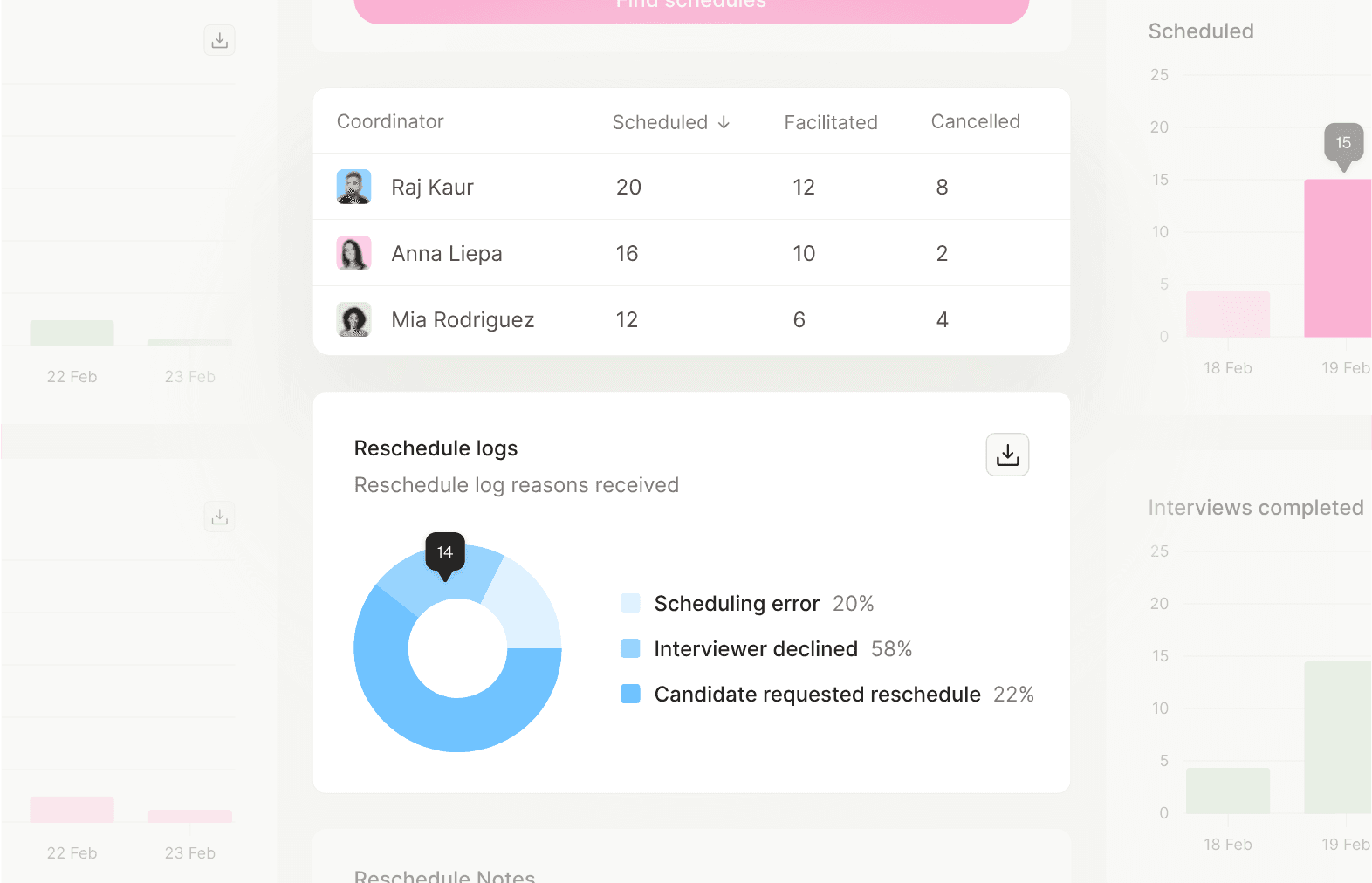
Reporting & Dashboards in ModernLoop: interviews scheduled, facilitated and cancelled by coordinator, and the reasons interviews were rescheduled.
Speed is the next question. Our guide to how to hire faster turns these metrics into levers, stage by stage.
Sources
- SHRM, “2025 Recruiting Executives Benchmarking: Insights to Maximize Recruitment” (data brief), shrm.org/content/dam/en/shrm/research/2025-recruiting-benchmarking-report.pdf (checked October 22, 2026)
- SHRM, “2026 Recruiting Executives Benchmarking: Attracting Critical Talent,” shrm.org/topics-tools/research/recruiting-benchmarking (checked October 22, 2026)
- ModernLoop, “How to Calculate Time-to-Schedule to Drive More Efficient Interviews,” modernloop.com/blog/how-to-calculate-time-to-schedule/ (read October 22, 2026)
Related articles

The speed levers at every stage, and the scheduling delay you can measure.
Reference points for time to schedule, reschedules and interviewer load.